By 2025, existing models have already become remarkably intelligent. However, even the smartest system cannot perform effectively without understanding what it is being asked to do. Prompr engineering refers to the practice of phrasing tasks in an optimal way for large language model-based chatbots. Context engineering, on the other hand, represents the next stage - aiming to automate this process within dynamic systems.
What is Context Engineering?
Tobi, from Shopify, shared an interesting post in which he expressed his appreciation for the term “Context Engineering.” Later, Karpathy followed up with a brilliant definition:
Context engineering is the art and science of filling the context window with just the right information at each step of an agent’s trajectory
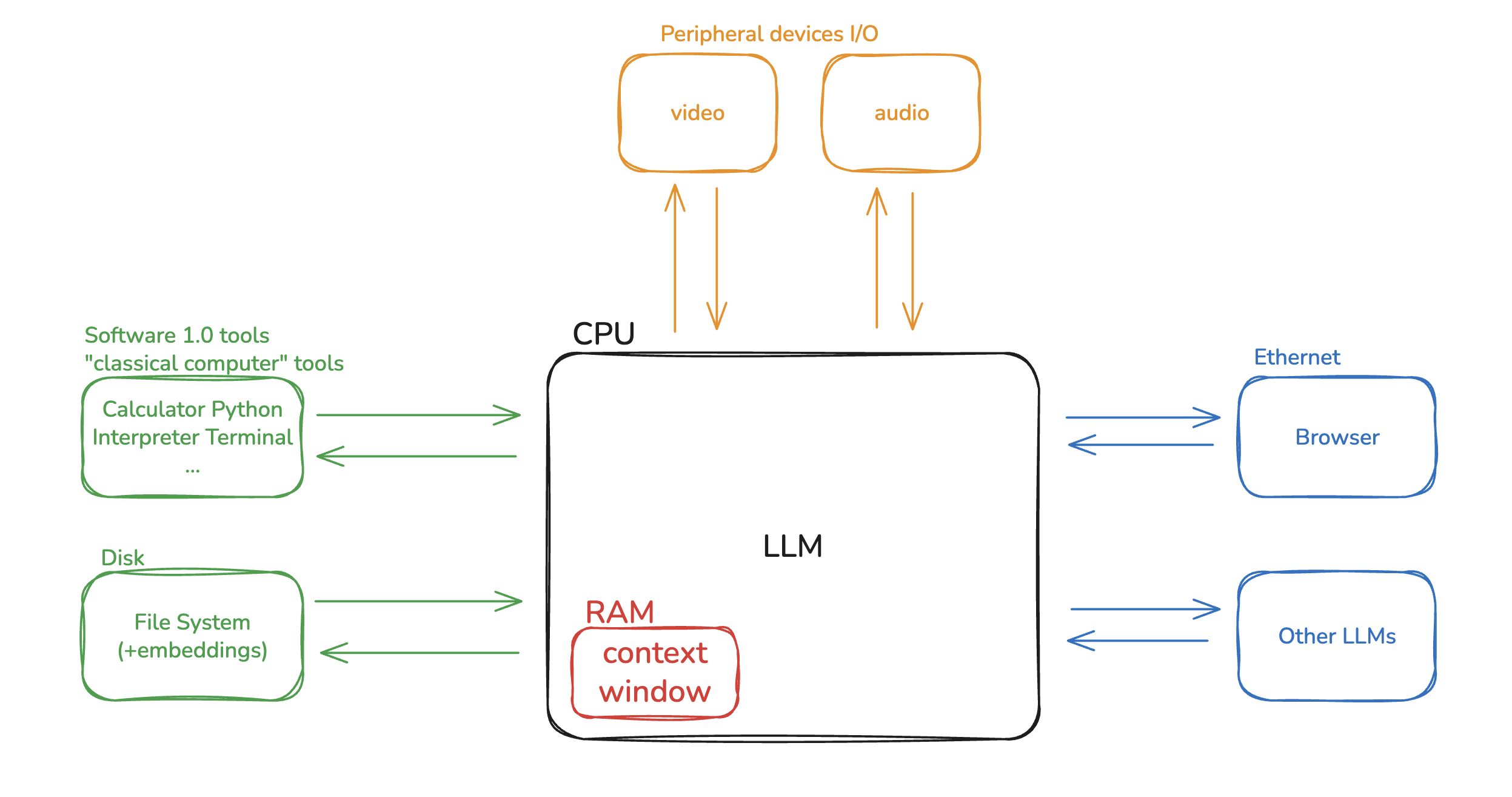
Karpathy made a powerful analogy: he compared LLMs to a computer’s CPU, and the context window to RAM. Just like memory is always limmited, and operating system decides what should be loaded into RAM to keep the system running effectivly. Similarly, the goal of context engineering is to determine what information should be placed into the limited context window at each step of the LLM’s reasoning process.
Types of Context Engineering
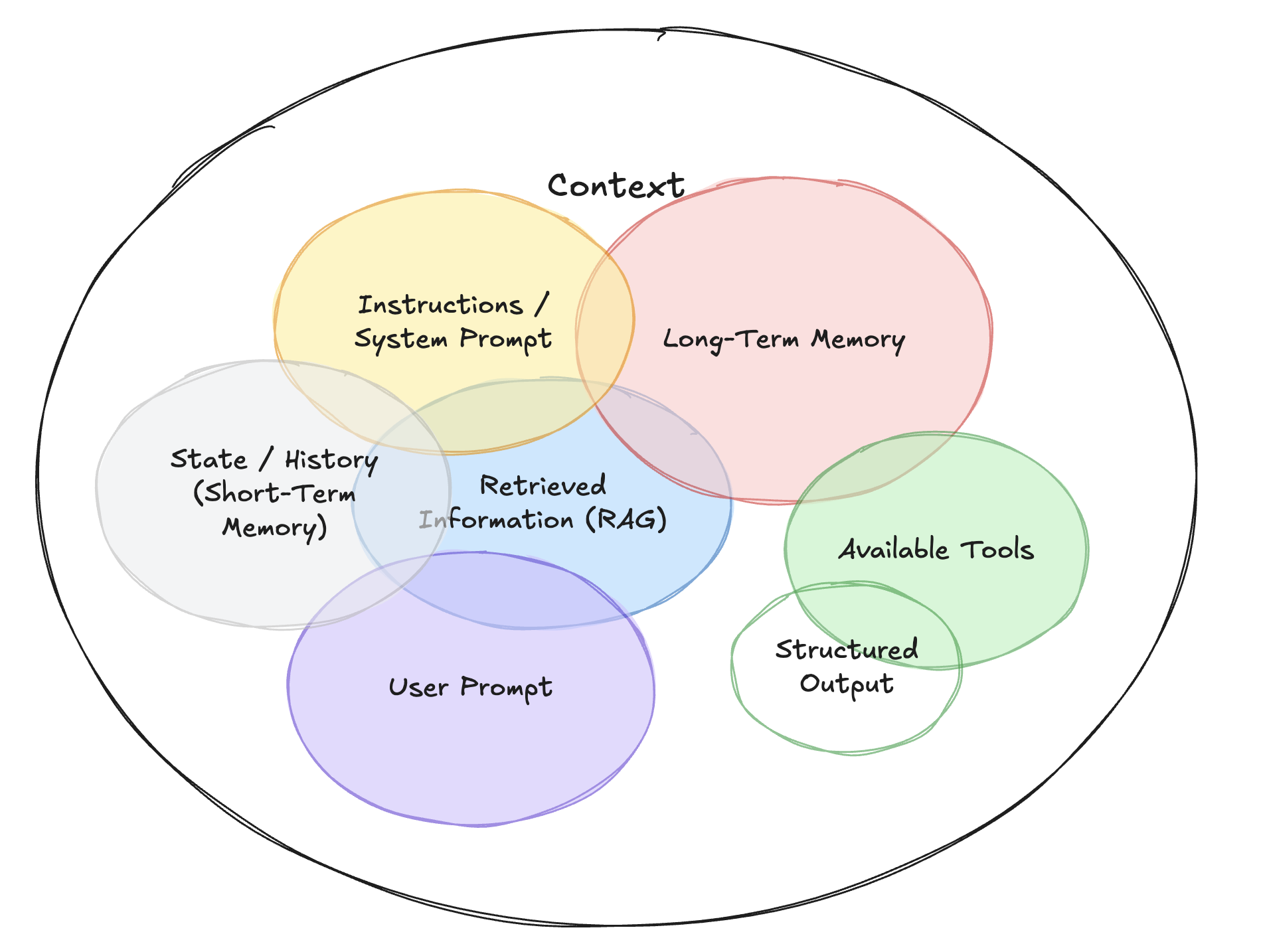
Context Engineering is an umbrella discipline that encompasses several types of contextual inputs:
- Instructions: Commonly referred to as “prompts”, these specify what the AI should do.
- Knowledge: Facts and data retrieved from external files or databases.
- Memories: Previous converstaion history or reference examples that provide continuity.
- Tools: Information about which tools that AI can use (e.g., calculator, search engine) and the results returned by these tools.
Why Is This Harder for Agents?
There are two main reasons why context engineering becomes more challenging for agents:
- Agents typically handle longer-running or more complex tasks.
- Agents extensively use tool calling.
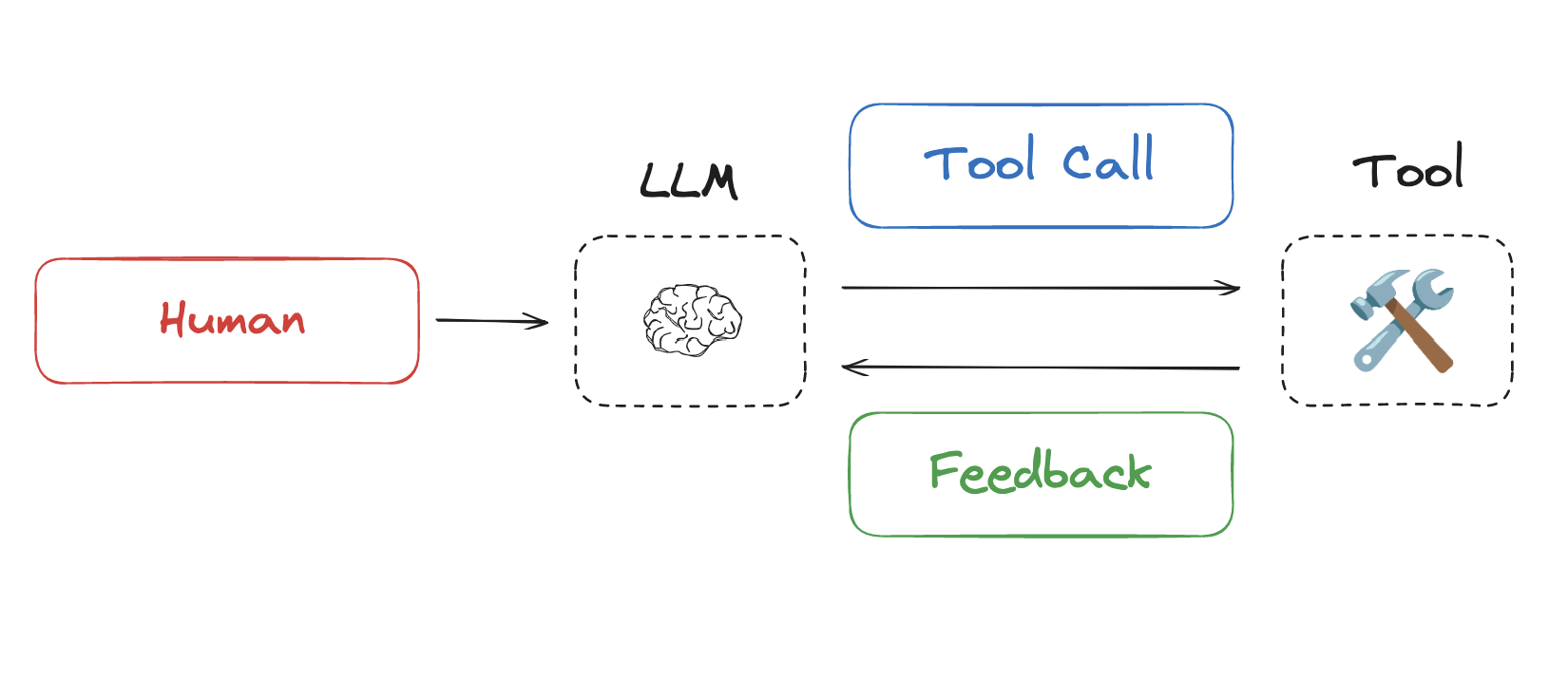
Both characterstics lead to increased context load. For example, in multi-turn tasks, each tool call’s feedback gets written to the context window. The first round calls one tool, the second calls another tool… As the number of rounds increases, the accumulated tool feedback in the context grows continuously, consuming significant tokens.

Drew Breunig provides an excellent summary of context failures in his blog post, including:
-
Context Poisoning: Malicious or misleading information injected into the context.
-
Context Distraction: Irrelevant information that diverts attention from the main task.
-
Context Confusion/Curation Errors: Poor organization or conflicting information.
-
Context Clash: Contradictory information that creates confusion.
As context length grows, models must process more information, increasing the likelihood of errors: they may become confused due to information conflicts or be misled by injected hallucinations, producing incorrect responses. As Cognition recently emphasized in a blog post:
Context Engineering is effectively the #1 job of engineers building AI agents.
Approaches
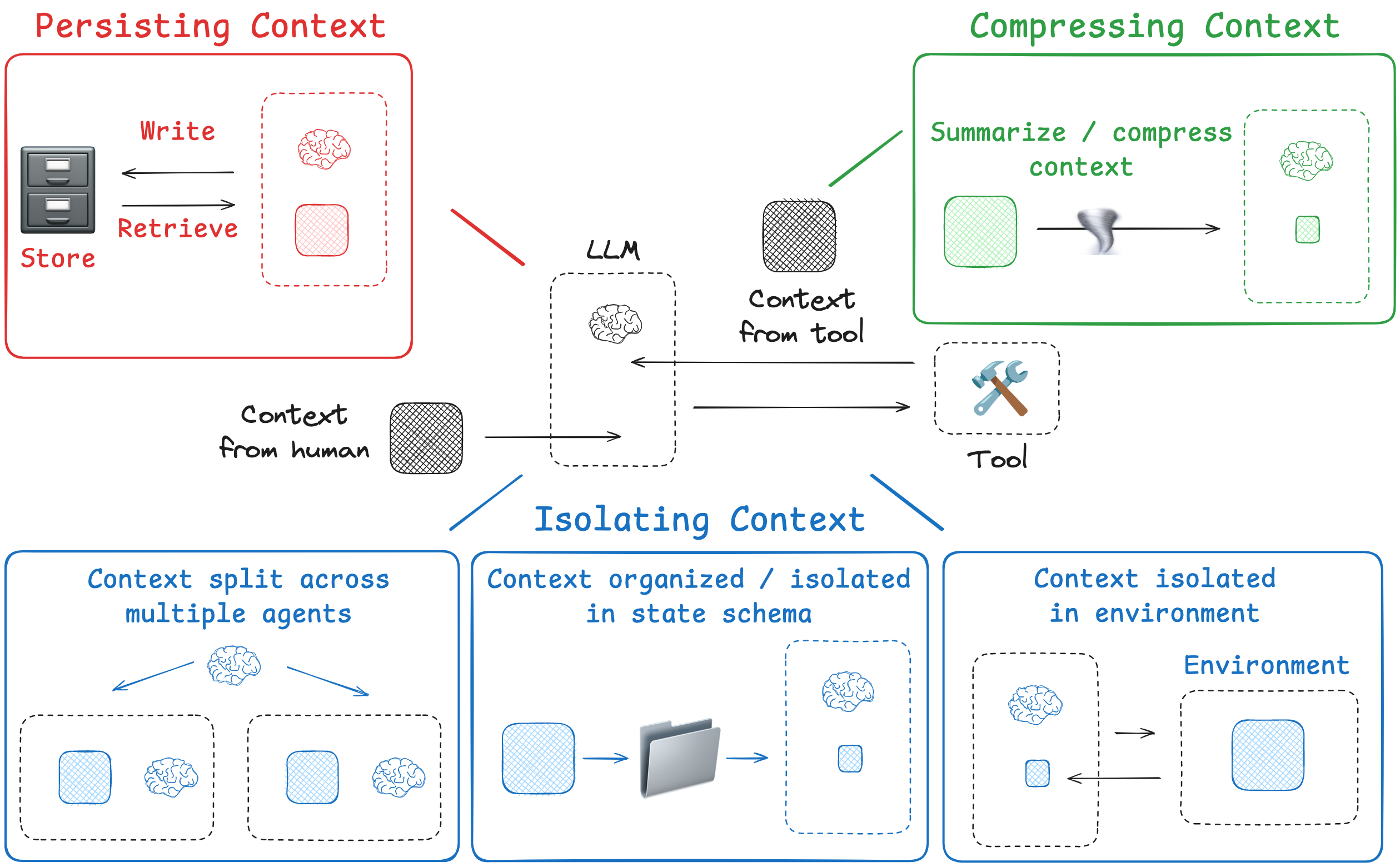
Lance outlines four main strategies for context engineering in his blog post:
-
Writing Context: Store information outside the context window to assist the agent in completing tasks.
-
Selecting Context: Selectively retrieve relevant context into the window to support execution.
-
Compressing Context: Retain only the most important tokens, removing redundant or irrelevant context to save space.
-
Isolating Context: Break context into segments or modules to reduce noise and enhace clarity.
Writing Context
The core idea of Writing Context is to store information outside the AI’s “short-term memory” (its context window) so it can be retrieved and referenced when needed. This mirrors how human tackle complex problems - we take notes and build memories. Similarly, agents can do both:
-
Taking notes -> Use a scratchpad
-
Building memories -> Use long-term memory
Scratchpad: Temporary Notes
When an Agent is carrying out a specific, single task, it needs a scratchpad to record intermediate thoughts, plans, or key information because it may need to refer back to them later.
Example:Anthropic’s multi-agent researcher
The LeadResearcher begins by thinking through the approach and saving its plan to Memory to persist the context, since if the context window exceeds 200,000 tokens it will be truncated and it is important to retain the plan.
The scratchpad can be implemented in different ways, for example:
- Saving drafts to a file(e.g., JSON, TXT) so the Agent can review them later.
- Storing notes in a runtime state object (such as LangGraph’s state) because this keeps the context alive while the task is running.
Core idea: Let the Agent “write as it works” because this allows it to immediately consult what it just wrote. Once the task is completed, the scratchpad is usually no longer needed.
Memories: Experiences Across Multiple Interactions
Memory is different from a scratchpad, because it is designed to store information that the Agent should remember across multiple, separate conversations or tasks. In this sense, it works more like the Agent’s accumulated “experience”.
Example:
-
Generative Agents: create “memory chunks” because they synthesize past interactions and feedback.
-
ChatGPT’s memory: automatically records user perferences, tone, and commonly shared details because these improve personalization in future conversations.
-
Cursor & Windsurf: generate memories from user behavior because this supports more coherent context completion.
As the Agent interacts with you, new information is generated. The Agent continuously receives new context and updates its memory dynamically because integrating fresh input with old knowledge creates a more complete, personalized background.
Selecting Context
In the Writing Context phase, information has already been stored. Now the challenge of **Selecting Context is to decide which part of this vast pool of information should be brought into the Agent’s limited “working memory”, because the Agent can only operate effectively on a small window of context at a time.
An Agent can choose content just “wrote” into the scratchpad, because that is the most immediate and relevant source. But more interesting and subtle is selecting from long-term memory. To understand this better, we can compare it to human memory types:
| Memory Type | What is Stored | Human Example | Agent Example |
|---|---|---|---|
| Semantic | Facts | Things I learned in school. | Facts about a user |
| Episodic | Experiences | Things I did. | Past agent actions |
| Procedural | Instructions | Instincts or motor skills. | Agent system prompt |
These memory types can be pulled into the context window in different ways because each type supports the Agent in solving a specific kind of problem.
Practical Applications
1. Instructions
Procedural memory often comes from rule or instruction files, because Agents need a stable reference for style guides or tool usage. For example, when using a code agent, the CLAUDE.md file may contain guidelines or standard instructions for a project. In many cases, these files are pulled entirely into the context window, because they provide the Agent with consistent rules to follow. For instance, when you start Claude Code, it loads relevant project and organization files.
2. Facts
When the knowledge base is very large (e.g., company-wide documents or all historical emails), we need to select only the facts relevant to the current query. Two common techniques are:
- Embedding-based Similarity Search: all documents are converted into vectors, and when a query comes in, the system finds the semantically, closest chunks because this ensures meaning-based matching rather than exact keyword overlap.
- Graph Databases: store information and their relationships as a graph, because this enables more complex logical queries than plain text search.
3. Tools
When an Agent has access to many tools, loading all tool descriptions indiscriminately hurt performance. Research shows that because tool count exceeds 30, LLM performance degrades, and at 100 tools, it nearly collapses. A common solution is applying RAG techniques to tool descriptions.
Each tool’s description is indexed like documents in a knowleage base. When a task arises (e.g., “Check the weather in Beijing tomorror”), the system performs semantic search to find the most relevant tool (e.g., “weather query”), and because only this selected tool’s usage guide is injected into the context, efficiency and accuracy improve.
4. Knowledge
RAG is a broad area. You can think of memory as a subset of RAG because memory focuses on personalization, while RAG broadly addresses knowledge retrieval.
Exanple: CodiumAI’s code retrieval strategy, as shared by Windsurf’s CEO Varun:
-
Smart Chunking: Code is split along semantic boundaries (e.g., a function or class) rather than arbitrarily, because this preserves meaning and ensures retrieved chunks are complete units.
-
Hybrid Search: Vector search is combined with keyword search (grep), knowledge graphs, etc., because relying on a single retrieval method can be unrealiable.
-
LLM-based Re-ranking: All candidate chunks are re-scored by an LLM, and the top results are selected, because this yields higher-quality context than raw retrieval alone.
This example shows that Selecting Context is not a single step, but a layered and highly engineered process, because each stage reduces noise and ensures the Agent gets the most relevant information.
Compressing Context
Even after writring and selecting information, the chosen content may still be too long, because even carefully selected data can exceed the limits of the context window. This is where Compressing Context comes in.
The core idea is: keep only the tokens (text units) necessary to execute the task, because removing redundant information frees up space while preserving utility.
Summarization
Summarization is the most common form of context compression, and it can be applied at different ranges and stages:
1. Summarizing the entire conversation
This acts as a fallback strategy, because it prevents overly long conversation from crashing the system.
Example: Claude Code “auto compact”
When using Claude’s code assistant, if the dialogue approaches its 200,000-token context window (at 95% usage), an “auto compact” function is traggered. It summarizes the entire conversation history into a shorter version, because this frees up space without losing essential continuity.
2. Summarizing specific parts
This is a more precise method, because it compresses only certain sections along the way instead of waitting until the very end.
- Completed work sections
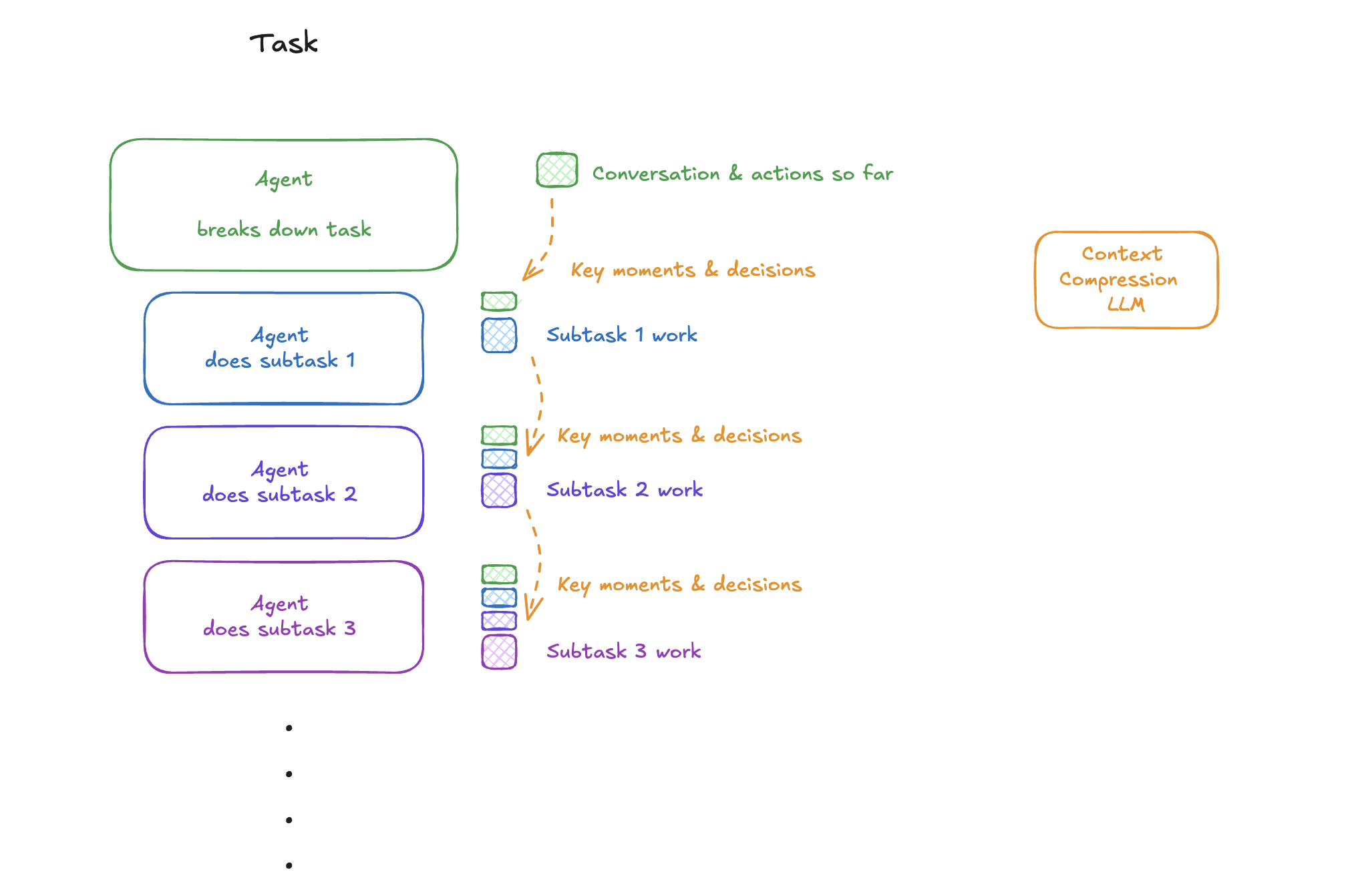
In Anthropic’s article How we built our multi-agent research system, once a subtask or research section is finished, the system summarizes that section. Because the summary preserves conclusions while discarding lengthy process details, valuable context space is saved.
- Passing context to linear sub-agents
In Cognition’s post Don’t Build Multi-Agents, tasks are broken down and delegated to sub-agents. Summarization is used as a form of information handoff: before passing work to Sub-Agent 1, the main agent generates a summary. Sub-Agent 1 reads this compressed version and can start immediately, because it doesn’t need the full raw context to understand the task.
Trimming
Besides generating summaries, there is a more direct way to compress context called triming. It does not rewrite content, because instead of rephrasing, it simply deletes tokens judged to be less important.
-
Heuristics:
This is the simplest method. For example, a rule like “keep only the last 10 turns of dialogue” works because older records are often less relevant to the current task.
-
Learned Pruning:
A smaller, faster LLM can be used to decide which parts of the context are less relevant to the task, and those parts are removed.
Isolating Context
The core idea of Isolating Context is to divide context into multiple independent segments, because letting each agent or task module only process the part of context it actually needs improves efficiency and scalability. This approach is especially effective for handling highly complex tasks.
Multi-Agent Systems
Instead of relying on a single “all-purpose” Agent, we can build a team of Agents, each with its own context window, tools, and instructions, so that every agent can focus on a specific responsibility.
1. OpenAI Swarm library
This framework is based on the principle of separation of concerns. A complex task is broken down and distributed across different AI agents. Because each agent works within its own independent context window, they can operate without interfering with each other.
2. Anthropic Multi-Agent Research System
In Anthropic’s research, sub-agents run in parallel, each exploring a different aspect of the same problem within its own context window.
Subagents facilitate compression by operating in parallel with their own context windows, exploring different aspects of the question simultaneously before condensing the most important tokens for the lead research agent.
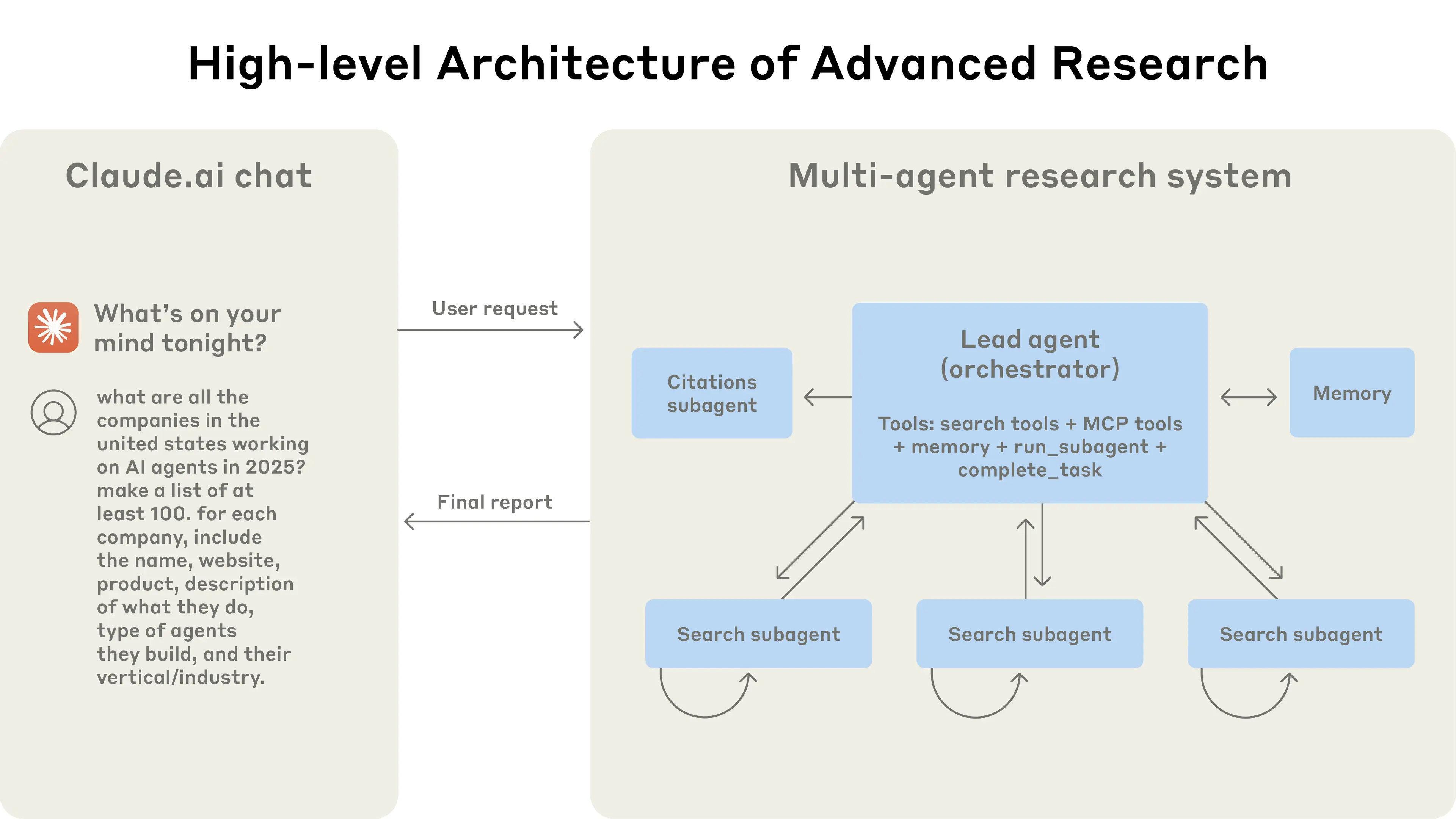
The biggest benefit is that the total information capacity of the system grows far beyond the limits of a single model’s context window. One agent can deeply investigate Subtopic A, another can focus on Subtopic B, and in the end, their results are combined because this produces a richer and more comprehensive report than any one agent could generate alone.
Sandboxed Execution
This method separates an AI’s thinking from its “execution”, because keeping heavy operations outside the LLM’s context window avoids wasting tokens on irrelevant details.
HuggingFace’s Open Deep Research

-
The Agent generates a snippet of code that describes the tools and logic it wants to run.
-
The code is executed in an isolated sandbox environment.
-
The sandbox can handle “heavy assets” such as large files, images, or audio-because these objects are too costly in tokens to load into the LLM’s context window.
-
After execution, only the most essential and compact results (e.g., a calculation output, file path, or state variable) are passed back to the LLM for the next round of reasoning.
The elegence of this method lies in the fact that the sandbox can persist state across multiple dialogue turns. This means you don’t have to reload everything into the LLM context each time, because the sandbox efficiently maintains continuity while isolating token-intensive objects from teh model’s working memory.
Runtime State Objects
This is a very direct, code-level way of implementing isolating, because it makes different kinds of the information explicitly separated into structured “buckets.”
We can define a dedicated data model for managing state (e.g., a Pydantic model in Python). Each fields acts like its own bucket:
-
A history bucket to store conversation history.
-
A file bucket to hold retrieved document contents.
-
A tool output bucket for results returned by external tools.
class AgentState(BaseModel):
    user_goal: str                       # The user's task goal
    plan_summary: str                    # Summary of the current plan
    tool_outputs: Dict[str, Any]         # Tool output bucket
    recent_messages: List[str]           # History bucket (dialogue history)
    retrieved_files: Dict[str, str]      # File bucket (retrieved document contents)
At any stage of the Agent’s runtime, you can decide which bucket to pull information from and how to combine it before passing it into the LLM. This works because it gives develops explicit control over what enters the context, while keeping different types of state neatly separated.